Showing posts with label Google. Show all posts

Google Assistant bests rivals for questions answered and overall accuracy

Google assistant
Earlier this year, Stone Temple Consulting released a virtual assistant consumer survey showing the majority of respondents wanted the assistants to provide “answers” rather than conventional search results. Today, the firm published a follow-up study that measured the relative accuracy of the four major assistants.

It compared results of “5,000 different questions about everyday factual knowledge” on Google Home, Alexa, Siri and Cortana, using traditional Google search results as a baseline for accuracy. The following table shows the study’s top-line results.
Google assistant bests rivals
As one might have anticipated, the Google Assistant answered more questions and was correct more often than its rivals. Cortana came in second, followed by Siri and Alexa. Of the questions it could answer, Amazon’s Alexa was the second most accurate assistant. Siri had the highest percentage of wrong answers of the four competitors.

One of the interesting observations in the report is about featured snippets. Cortana had more featured snippets integrated than any of the others, even Google Home, although Google search had more. Siri and Alexa lagged far behind in the category, although they want to use third parties to deliver “answers” and transactional capabilities.

Google now let's you submit URLs in Google's search results

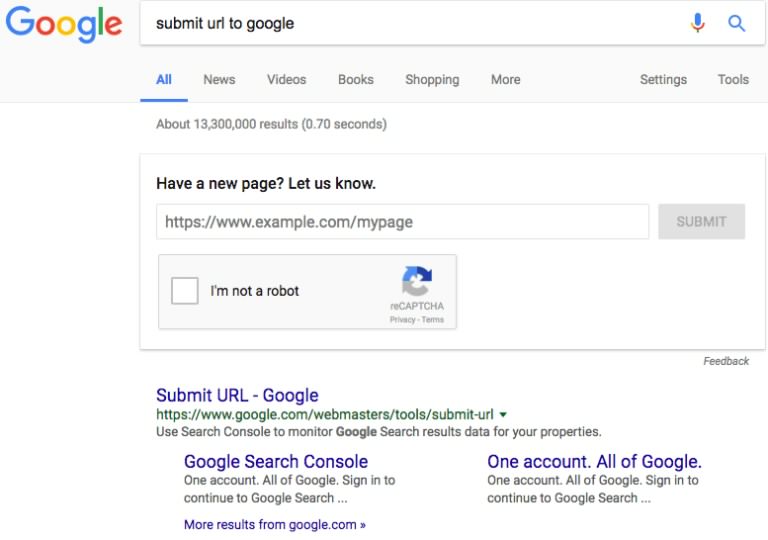
Google search result
Google now lets you submit your URLs to their index directly from their Google search results page as seen in the image above. To get this done, all you need to do is search for "submit URL to Google", and Google will display a box at the top of the search results that enables you to submit a URL to Google’s index.

This is exactly same as the functionality of the public submit URL form tool but places it directly as a smart interactive answer directly in the search results.

With this tool, you can submit any URL you want to the Google index. Google will then review and see if they want to index the URL and show it in their search results. Of course, submitting a URL to Google for inclusion in their search index does not assure you that it will be included in the index.

You Can Now Send And Receive Money in Gmail on Android

google wallet
Google Wallet was integrated into Gmail on the web since 2013, but now here is the latest update from Google wallet. Google has rolled out a new integration on mobile, which allows users of the Gmail app on Android to be able to send or request money with anyone, including those who don’t have a Gmail address, with just a tap.

Google explains in its announcement that this feature has been designed to make exchanging money as easy as attaching a file. To access the new feature, you tap the attachment icon (the paperclip), then choose either send or request money, depending on your needs. A pop-up window appears where you can input the amount and add a note, and send.

The entire process takes place in the Gmail app — you don’t have to have Google Wallet installed. In addition, recipients can configure it so the money they receive through Gmail goes directly into their bank account and the  best part if it is, there are no fees involved.

google wallet
The goal, seemingly, is to take on quick payment apps like PayPal, Venmo or Square Cash, by offering a feature to move money right within Gmail’s app. This could be useful for those times where the money is already a topic of an email conversation — like when you’re planning a trip with friends, or getting the family to go in together on a gift for your parents, for example.

This feature is not yet available to users in Nigeria. Let us know what your take is on this update.

Google Search For Android Now Available In Offline Mode

Google search offline mode
Google stuns its search users on android devices with the introduction of an offline mode. This mode will allow you to store up your searches on the Google app so you can see the results later when there’s stable connection. An effective feature, especially for the absent-minded ones.

Whats your take on this feature?
Is it really needed when you can use your notepad to save information and get them back anytime you choose to.

To get this feature simply update your Google app from the PlayStore.

Google Apps For Work Rebranded, Now G Suite

google g suite
Google has re-branded and enhanced its productivity suite with new intelligent capabilities. G Suite is the new name for the group of applications that include Gmail, Google Calendar, Docs, Sheets, and Slides. It's a group of apps that the company is trying to push on organizations looking to make their employees more productive, with an emphasis on collaboration capabilities.

Docs, Sheets, and Slides will each be getting new features that is aimed at making it easier for users to create files quickly with the help of Google intelligence. Also, Google Calendar is getting a new feature that will make it easier to schedule meetings, while Drive has a new feature making it easier for teams to use.

A standout amongst the announcements for enterprises is a new Team Drives feature that lets organizations set up groups that own files inside Google Drive. It's a shift from the product's previous design, which required every document, spreadsheet or slide deck to have a single person own it. The change could be important for organizations that want to more easily manage files as people come and go from teams.

Now, teams can have their own folder inside Drive and can own all of the files inside of it. Administrators can control access to the team Drive, and people can come and go.

In addition, the Google Hangouts video-conferencing service will gain capabilities that make it possible for people to join meetings from any device, without needing to have an application or plugin installed.

Docs, Sheets, and Slides are each getting new features that is aimed at making it easier to intelligently create documents. In Docs, the existing Research feature has been rebranded as Explore and enhanced to quickly and automatically surface information about the subject of a document, both from the web and from files shared in Google Drive.

In Sheets, the Explore feature will now let users ask questions in natural language about data in a spreadsheet and get information back. It's similar to the Q&A feature in Microsoft's Power BI service, which makes it easier for people to get insight from potentially messy data without knowing complicated spreadsheet editing capabilities.

The Slides feature makes it easier for users to find images that fit into their presentations with its Explore functionality and will automatically help lay out text and images to make them more visually appealing, thanks to the power of machine learning.

Android users will also get access to a new Quick Access capability in Google Drive that's designed to give people fast access to the files they need to work on after they open the app. It's powered by machine learning and designed to reduce the amount of time that people have to spend searching Drive for the files they need.

Do you think this re-branding will help Google better compete with Microsoft Office 365?

Say Hello To Google Allo, Now Available For Download

google allo
Google has finally released it’s new instant messaging app, Allo and it is now available for download on Google Play Store and Apple App store.

Allo was announced at Google I/O 2016 and was promised to be available to users by the end of the summer. Just like Duo that was released a couple of weeks back, Allo is tied to your phone number. That means you won’t need to sign up for an account, all you need do is input your phone number and you are good to go.
google allo registration

Allo is packed with lovely features like stickers, smart reply, ability to draw on the screen, but the most amazing feature on Allo is the Google assistant.
google allo stickers
You will be able to chat up Assistant by typing “@google” and Assistant will readily answer your questions and queries with fast and accurate answers. On Android, the backgrounded Google Play Services will ping contacts you message via Allo, even if they have yet to download the app and upon receiving the notification, they can even reply to your message whether or not Allo is installed. This feature will not be available to those on iOS or any other platform.
google assistant

Allo is now available for download on Play Store and App Store, so you can go and download it now.

Download Allo For Android | iOS


Google Removed Over 1.75 Billion Websites From Search Results

Google has removed as many as 1.76 billion websites from Google search results as of the time this article was being composed. This can be confirmed on the Google transparency report counter.
In March 2016, Google recorded about 75 million takedown request in other to keep pirate websites out of its search results. There have also been a major increase in the takedown requests. The overall amount of copyright requests is estimated to have increased by 53% Year over Year.

Within the transparency report counter, you can also track the amount of takedown requests Google has received over time. Google has zero tolerance for such issues so they have decided to take the bull by the horn, by responding to the requests. Currently there is no pending requests available.

You can also apply for a takedown request but you have to note that such requests made to Google have to go through a 4-stage review process, which is as follows:

  • A copyright owner sends us a takedown notice for allegedly infringing material.
  • Google reviews the request, and complies if there aren’t issues with it.
  • Following DMCA process, a webmaster may issue a counter notification.
  • Upon receiving a counter notification, we decide whether or not to reinstate the material.

The company has also made it quite clear that it does not act as a mediator. If the copyright owner or the webmaster is still unhappy with the decision, they can file a lawsuit and leave the matter to be decided by the courts.

You Can Now Play Solitaire And Tic-Tac-Toe In Google search

Google recently announced the adding of a couple of fun little nuggets to Google search. The company will now allow you play solitaire and tic-tac-toe right inside your search results.
Google's Solitaire Game
Goolge's Tic-Tac-Toe Game
To play these games, you just need to search for "Solitaire" or "TIc-Tac-Toe." Both searches will bring up the games, which you can play directly in your browser or the Google app.

The feature is available for users accessing Google either from desktop or mobile device. When searching for the keywords “solitaire” or “tic-tac-toe” you will see the usual search results, but featured prominently alongside them you’ll also now see a “tap to play” option that takes you directly to play the game.

The Tic-Tac-Toe game has both single and two-player modes. Single players can also choose the level of difficulty they want to play at.

This new feature from Google actually saves you the stress of searching for or downloading apps that has these games.
What do you think about having this games on Google search?
Designed by Kaesy Nwosu